

Happy Sunday, friends!
Welcome back to the weekly look at generative AI that covers the following:
Sunday Rundown (free): this week’s AI news + a fun AI fail.
Sunday Bonus (paid): an exclusive segment for my paid subscribers.
In case you missed it, here’s this week’s Thursday deep dive:

If you’re consistently missing out on my emails, remember to check your “Promotions” tab and mark whytryai@substack.com as a “Safe Sender.”Let’s get to it.
🗞️ AI news
Here are this week’s AI developments.
👩💻 AI releases
Alibaba open-sourced Qwen3.5 Small, a family of compact multimodal models optimized for on-device use with strong performance despite their small size.
Anthropic news:
Claude Memory is now free for everyone, with a new import tool to migrate preferences and context from other AI chatbots.
Scheduled Tasks in Claude Code desktop let you automate regular tasks for Claude to run on a schedule.
Skill Creator is now better and can help you test, measure, benchmark, and improve your Agent Skills. (Learn more about Claude Code skills here.)
Google news:
AI Mode rolled out Canvas in the US, so you can accomplish writing and coding tasks directly inside search.
NotebookLM can now turn notes into cinematic video summaries powered by Nano Banana Pro and Veo 3. (Only for Gemini Ultra subscribers for now.)
Gemini 3.1 Flash-Lite is the fastest, most cost-efficient model in the Gemini 3 family.
LTX Studio launched dubbing and captions that can translate videos into 175 languages with accurate lip sync. (Enterprise-only feature for now.)
Microsoft open-sourced Phi-4-Vision-Reasoning, a compact multimodal reasoning model that excels at vision-language, math, and science tasks.
OpenAI news:
ChatGPT for Excel is rolling out in beta to help you build models and generate outputs directly in Excel, powered by GPT-5.4.
The Codex app launched on Windows, letting you manage multiple agents that collaborate on long-running tasks.
GPT-5.3 Instant offers smoother conversations, fewer hallucinations, and less defensive or moralizing phrasing.
GPT-5.4 is the company’s latest and best reasoning model with a 1M-token context window and improved coding and tool use.
Perplexity introduced Skills for Perplexity Computer, letting you teach it repeatable actions and capabilities that it can apply automatically.
xAI released Grok 4.20 Beta 2 with better instruction following, reduced hallucinations, and LaTeX support for scientific text.
🔬 AI research
Anthropic started rolling out a speech-to-text Voice Mode in Claude Code, so far to just 5% of users but with a wider expansion planned in the coming weeks.
OpenAI is rolling out Codex Security in research preview for AI-driven vulnerability detection and patching.
📖 AI resources
“Labor Market Impacts of AI” [REPORT]: Anthropic’s study outlining early hiring slowdowns in the most AI-exposed roles.
“Understanding AI and Learning Outcomes” [REPORT]: OpenAI’s framework to measure how AI affects learning retention, motivation, and problem-solving.
🤦♂️ AI fail of the week
Boy, that escalated quickly. Grok Imagine proudly brings you…a self-fatality?
💰 Sunday Bonus #92: Create supporting visuals for any text with "Article Visualizer"
If you’re anything like me, you don’t have the world’s best eye for design.
This means I often struggle to find ideas for visuals that can illustrate my articles.
Enter: Article Visualizer.
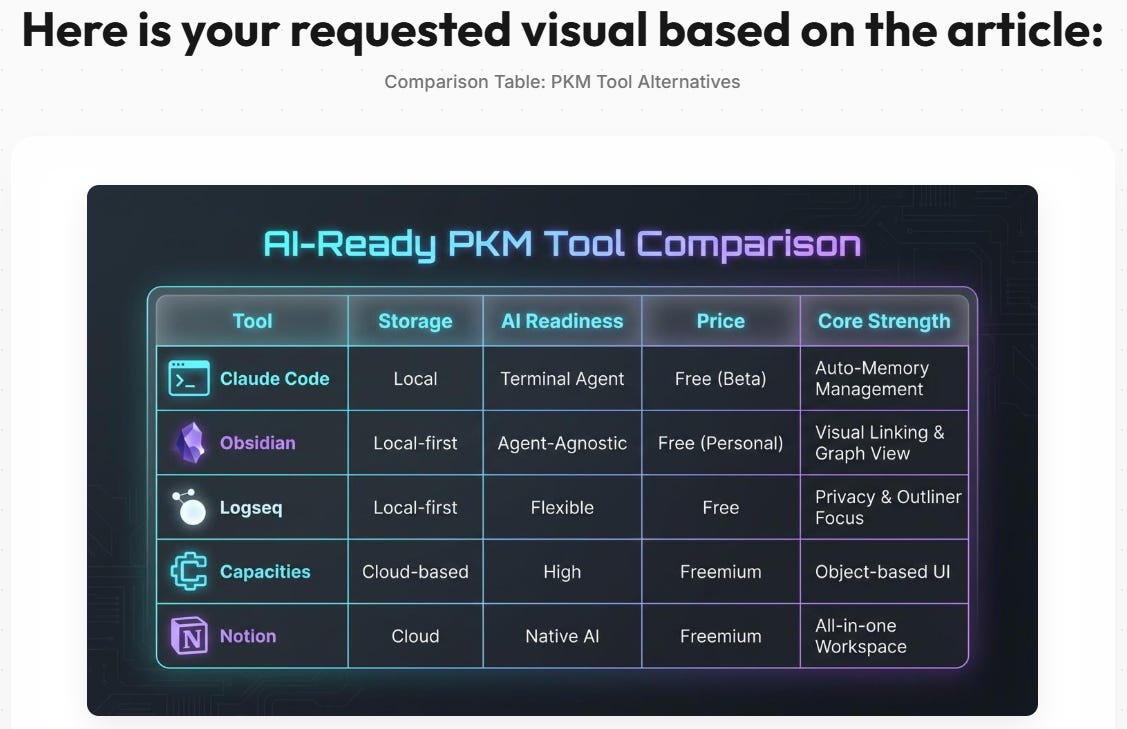
It’s a simple Google Opal app that analyzes your text (paste it in or provide a URL), and proposes up to five visual concepts to support your content: comparison charts, diagrams, infographics, graphs, etc.

You pick the one you prefer and get a finished visual to download:
If you liked Data Narrator, this is its sibling:
Data Narrator helps you make sense of data by visualizing it
Article Visualizer helps your readers better understand concepts in your articles
All you need is a free Google account.
Enjoy: