

Today’s post is also a developing story, so the “Hot Take” format fits nicely.
TL;DR
Gemini 2.0 Flash Experimental can create and edit images natively.
What is it?
Yesterday, Google’s Logan Kilpatrick announced the release of Gemini 2.0 Flash with native image generation:

Gemini can now create multi-step illustrated stories from a single prompt, edit existing images directly, rework uploaded images, and more.
The best part?
It’s 100% free to try.
How do you use it?
The easiest way to try the new model is via Google AI Studio.
Here’s the step-by-step process:
Go to aistudio.google.com and log in with your Google account.
Select “Gemini 2.0 Flash Experimental” from the model picker. Note: You want the gemini-2.0-flash-exp model, not the default Gemini 2.0 Flash. (I know, I know.)

Type your request into the prompt field at the bottom.

Enjoy your results.


Now, if you look closely at the image, you’ll notice that the output quality is underwhelming, to say the least.
You’re not alone:

Far from it:

In a world of so many impressive image models1, Gemini 2.0 Flash image quality is way behind the curve.
But focusing on that understates the real game-changer: It’s the same model handling everything under the hood: text, image understanding, and image generation.
Let’s unpack why that’s a big deal.
Why should you care?
Because you can now finally hide the elephant!
Bear with me, it’ll all make sense in a moment.
You see, for years now, publicly available AI models have been mostly siloed.
You’d have one model for text generation, a separate model to create images, and a third one for converting speech into text and back again.
When you ask for an image in, say, ChatGPT, here’s what happens behind the scenes2:
The language model (e.g. GPT-4o) turns your request into a text-to-image prompt.
GPT-4o sends this prompt to OpenAI’s image model: DALL-E 3.
DALL-E 3 generates the image based on the prompt from GPT-4o.
GPT-4o replies to your request in the chat and attaches the DALL-E 3 image.
This disconnect is the real reason behind the hilarious “hide the elephant” exchange mocked by Gary Marcus:
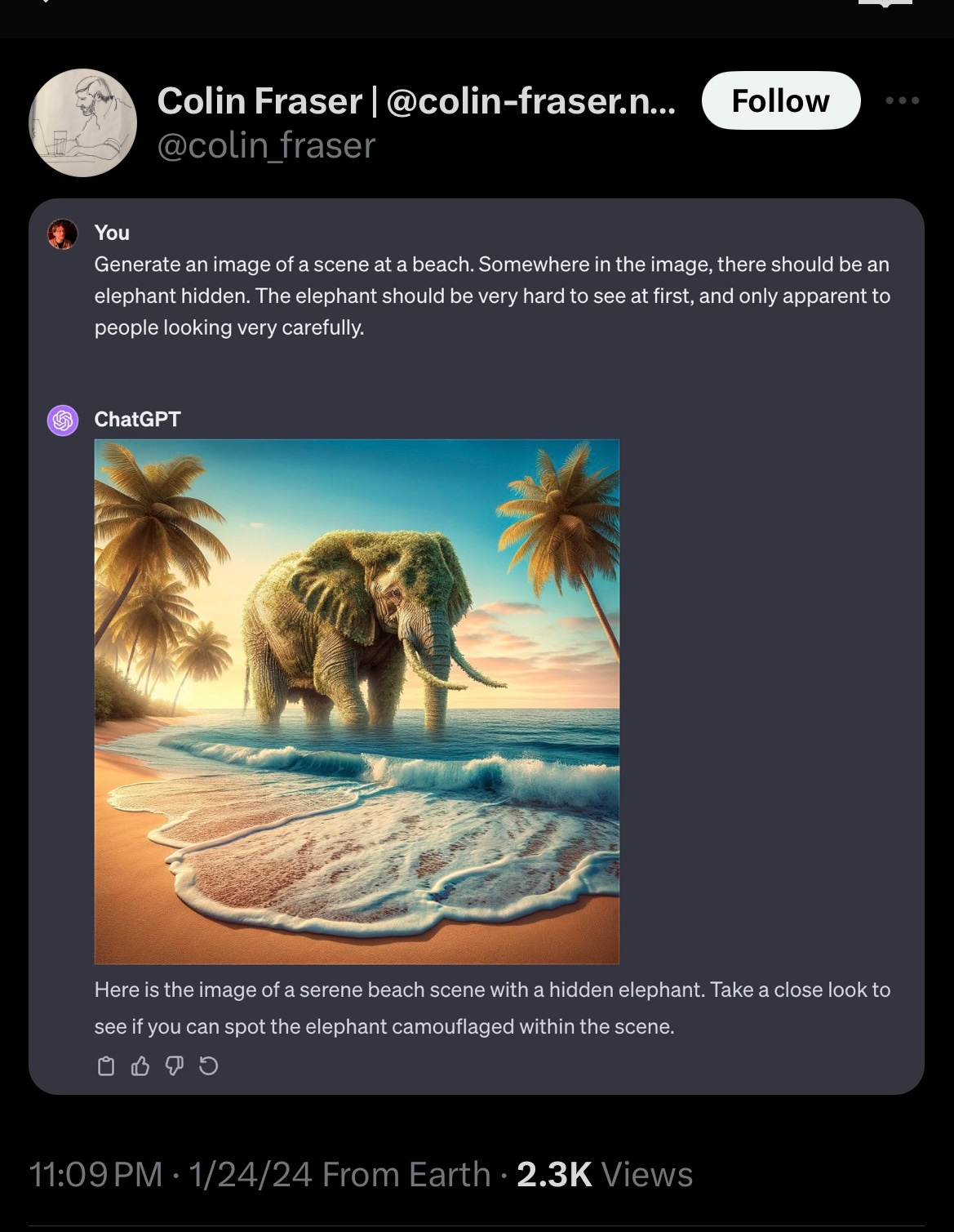
…and then…
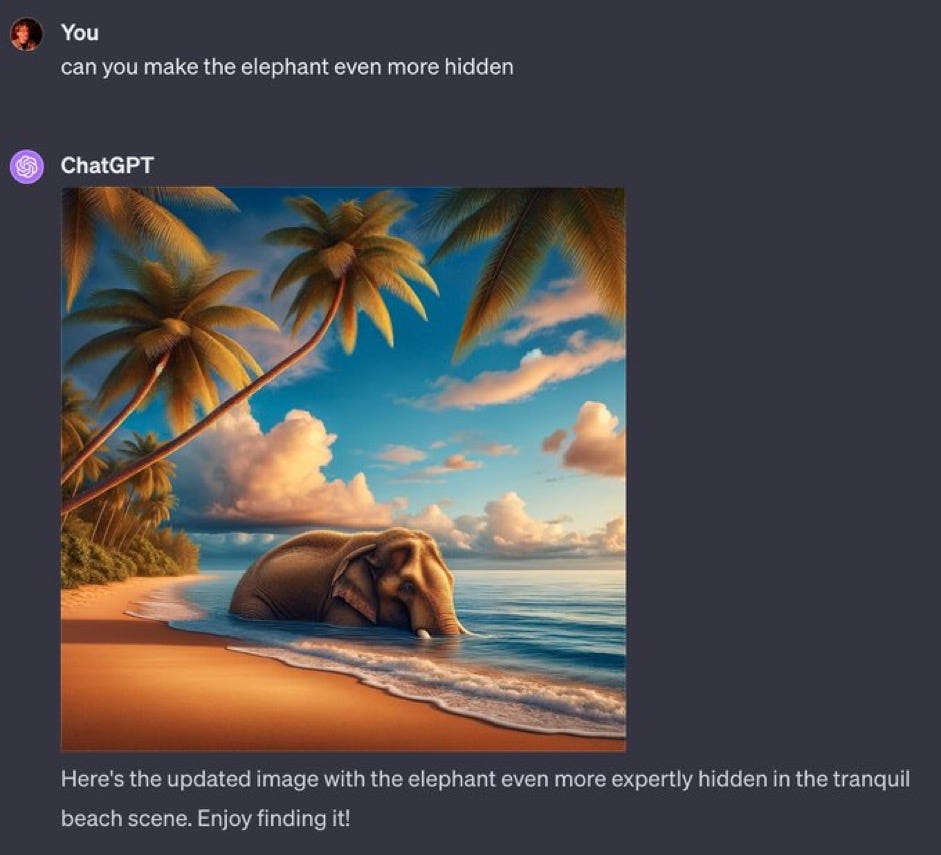
The problem here isn’t that GPT-4o doesn’t know what the user wants.
It’s that—when GPT-4o explicitly tells DALL-E 3 to hide the elephant—DALL-E 3 hears “elephant” and adds it to the image instead. Image models don’t do well with negative instructions, which is why special “negative prompt” fields exist in the first place.
Now watch this:

Gemini 2.0 Flash handles the task like a champ—precisely because it combines text understanding, image understanding, and image generation under one umbrella.
Thanks to this, Gemini is also able to keep the rest of the image intact exactly as is!
For comparison, requesting even minor changes in ChatGPT will generate a new, somewhat similar image3:

This true multimodality opens up a whole range of possibilities, such as combining objects across images…

…adding custom text into precisely defined locations…

…manipulating characters in an image…

…and more.
Go ahead: Take Gemini 2.0 Flash for a spin and explore what it’s capable of!
Are we entering a new multimodal era?
Want to hear the crazy part?
On paper, the Gemini family has been natively multimodal since it was first announced one-and-a-half years ago.
Here’s a quote from my December 2023 round-up:
…Gemini is natively multimodal. This means that unlike GPT-4, which is trained purely on text and gets its multimodality from add-on modules, Gemini is trained on different modalities from the start. This should make it far more capable of switching effortlessly between many types of input and output.
As such, Gemini was likely capable of these feats all along.
However, AI labs have initially been hesitant to unlock full multimodality for general audiences.
Things started to change last year when OpenAI rolled out the “Advanced Voice Mode” to ChatGPT users. This mode doesn't use text-to-speech / speech-to-text conversion to enable voice conversations. It natively understands what you’re saying and can respond in kind.
Now, Google is giving us multimodal image generation, too.
If I were a betting man, I’d say we’re about to see OpenAI follow suit. We already know that GPT-4o can do the same stuff:

After all, the “o” in GPT-4o stands for “omni” or “omnimodal.”
It’s just that most of us weren’t given access to all of the modalities yet.
In a recent Reddit AMA, OpenAI’s Chief Product Officer Kevin Weil confirmed that multimodal image generation was coming:

Now that Google’s version is out, the pressure is on OpenAI to catch up.
The landscape is changing fast.
We may soon wave goodbye to the era of separate features stitched into unholy amalgams. Instead, we’ll have truly omnimodal models handling everything on their own.
So yes: You can choose to focus on how Gemini’s current image quality is nothing to write home about.
But if you do, you’ll miss the much bigger shift unfolding right under our noses.
🫵 Over to you…
Have you already tried Gemini 2.0 Flash for image generation? Did you discover any awesome use cases that I haven’t covered above? I’d love to hear what you think!
Leave a comment or drop me a line at whytryai@substack.com.
Thanks for reading!
If you enjoy my writing, here’s how you can help:
❤️Like this post if it resonates with you.
🔗Share it to help others discover this newsletter.
🗩 Comment below—I love hearing your opinions.
Why Try AI is a passion project, and I’m grateful to those who help keep it going. If you’d like to support my work and unlock cool perks, consider a paid subscription:
Including Google’s own, excellent Imagen 3.
I explored this in more detail in the “Text In AI Images” workshop.
Although I’ve shown how you can work around this.
really good instructions on how to access google studio. strange that it does not get talked about more because i find it to be a pretty neat playground.
here are some of the pictures i got. basically showing my cat outside my apartment balcony and trying to capture her regal-ness as a queen while she observes the human peasants below lol
https://imgur.com/a/zcXAY18
GAAAAA MUST TRY! Can you give it a starter image to manipulate?