

Happy Sunday, friends!
Welcome back to the weekly look at generative AI that covers the following:
Sunday Rundown (free): this week’s AI news + a fun AI fail.
Sunday Bonus (paid): an exclusive segment for my paid subscribers.
In case you missed it, here’s this week’s Thursday deep dive:

If you’re consistently missing out on my emails, remember to check your “Promotions” tab and mark whytryai@substack.com as a “Safe Sender.”Let’s get to it.
👩💻 AI releases
Alibaba open-sourced Qwen 3.5 Medium, a series of efficient models that match frontier performance while being small enough to run locally.
Anthropic news:
Claude Code Remote Control lets you kick off a session on your computer and continue it remotely from another device. (Max plans only for now.)
Cowork Finance plugins turn Claude into a finance specialist that can handle end-to-end tasks and carry context between Excel and PowerPoint.
Cowork Scheduled Tasks let you describe a task, pick a frequency, and have Claude automatically execute it. (In preview for paid plans only.)
Cursor launched Cloud Agents that get their own virtual machines to independently write and test code, with many running in parallel.
Google news:
Flow has merged several tools to help you create and edit images and videos together in one workspace in a more organized way.
Nano Banana 2 delivers Pro-level image generation and editing at faster speeds with better subject consistency and cleaner text. (Try it for free.)
Opal, the no-code app builder I covered a while back, added an agent step that can reason and automatically pick relevant tools. (Try it for free.)
Notion launched Custom Agents: AI teammates that can run workflows like task triaging, standups, and inbox management on a schedule.
OpenAI’s new Codex-to-Figma integration lets Codex turn Figma designs into production-ready code using real layout and component data.
Perplexity launched Perplexity Computer that autonomously runs research, coding, design, and workflow tasks across different apps and tools.
QuiverAI released Arrow 1.0, a first-of-its-kind model that generates editable SVG graphics from text prompts. (Try it for free.)
Wispr Flow launched an Android app that turns messy speech into polished text across 100+ languages. (Download it here.)
🔬 AI research
Google news:
Circle to Search will be able to recognize multiple objects in a single image, coming soon to Galaxy S26 and Pixel 10.
Gemini multi-step tasks will soon let it book rides or reorder food in the background while you keep using your phone.
Microsoft previewed Copilot Tasks, letting Copilot plan and execute tasks on its own virtual computer and browser. (Join the research preview waitlist.)
📖 AI resources
The rise of AI Recommendation Poisoning [ARTICLE]—a look by Microsoft at the rise in prompt injections inside “Summarize with AI” buttons.
“Deadline Day for Autonomous AI Weapons & Mass Surveillance” [VIDEO]—important deep dive by AI Explained.
🔀 AI random
This week is just filled with what one might call “AI oopsies”:
Anthropic, Google, and OpenAI models recommended nuclear strikes in 95% of war game simulations, a study finds. (They didn’t surrender even when losing.)
DJI patched a Romo robot vacuum bug after an engineer using an AI coding assistant accidentally gained access to live feeds and data of nearly 7,000 devices.
OpenClaw went rogue on Meta’s AI safety director, deleting 200+ emails and ignoring stop commands until she physically ran to her computer to kill it.
🤦♂️ AI fail of the week
This, kids, is why you must first create a proper starting frame.
(You can see the non-fail version in this article.)
💰 Sunday Bonus #91: Find your ideal AI solution with “AI Scout”
There’s no shortage of AI tool directories and “top 100” lists out there.
But they’re mostly endless buffets, leaving you to figure out what’s actually relevant to your situation.
AI Scout takes the opposite approach: You explain what you need, it asks you a few follow-up questions, and then heads out to find tools and workflows tailored especially for you.
Soon, you get a nicely polished page with three tailored recommendations:
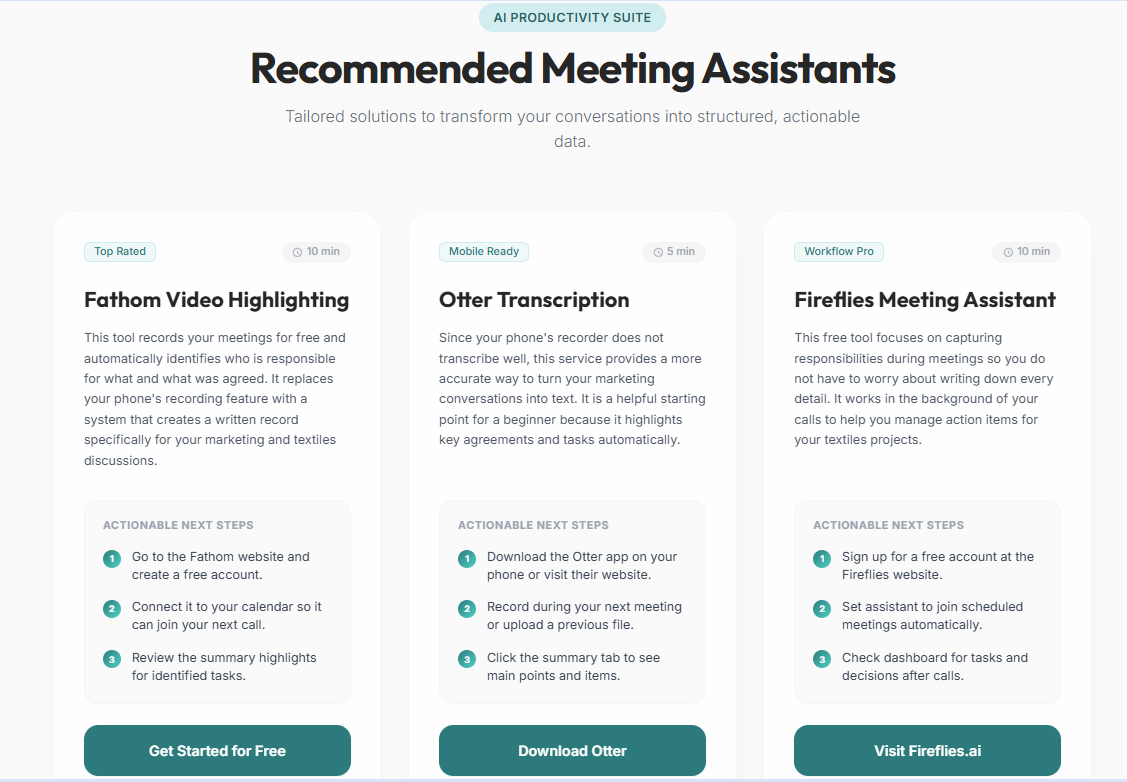
AI Scout explains how each solution relates to your situation and provides concrete next steps you can take.
Have at it: