

An earlier version of this article first appeared as a guest post for Forward Future.
Ask the average person what AI is, and most will picture a chatbot. That’s not exactly shocking. The product that kicked off the AI craze was literally called ChatGPT.
And chatbots continue growing in popularity. The share of Americans who use chatbots has jumped from 33% in 2024 to 49% in 2026. Taken on its own, this growth sounds impressive.
But in the meantime, companies have already moved on to the next big thing: agents.
The good news is that agents no longer require a complex technical setup beyond the reach of mere mortals. Quite the opposite, actually. There’s never been a better time to get started with your very own desktop agent.
Enterprises are all-in on agents…
Take a look at this chart:
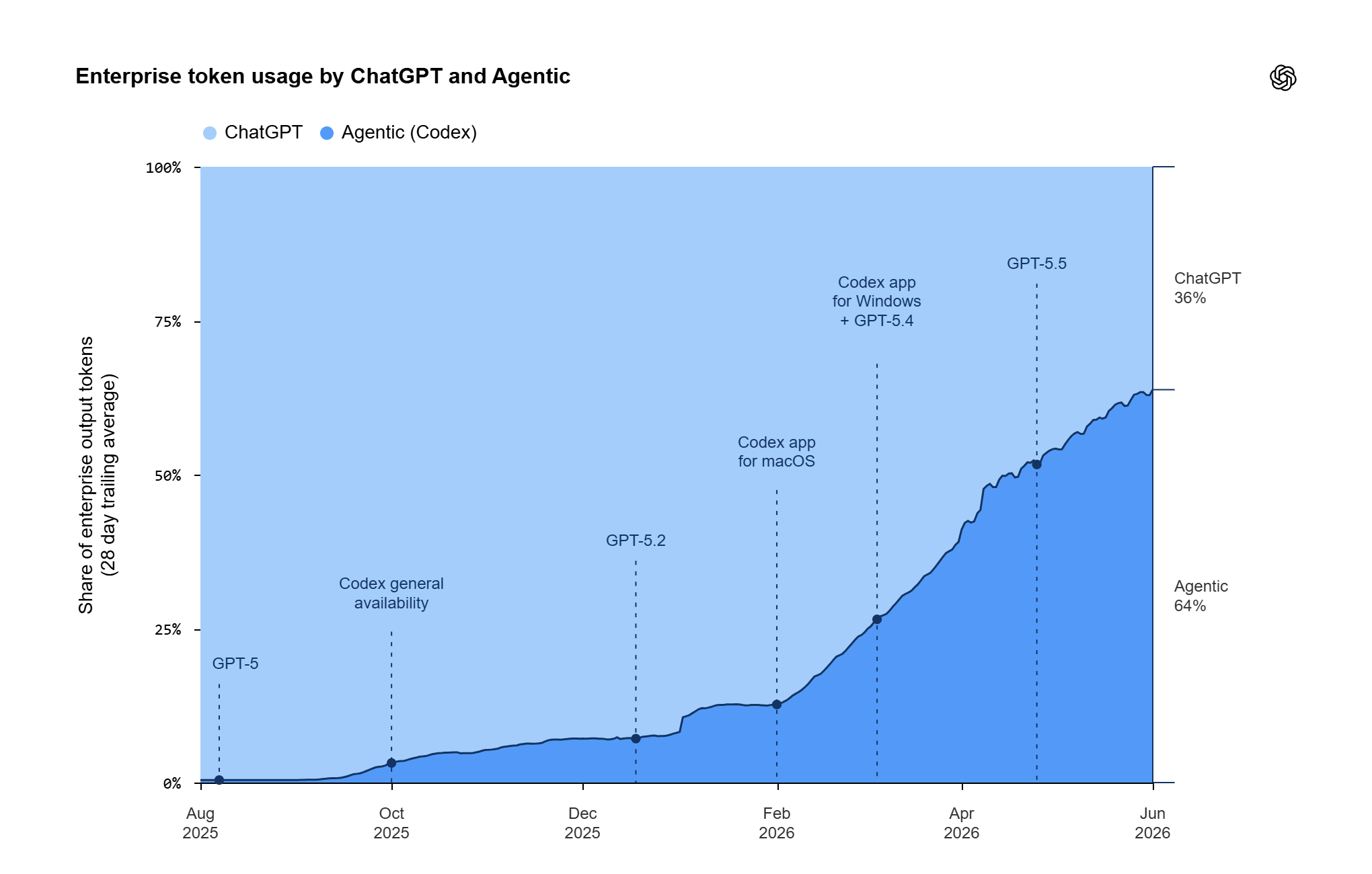
OpenAI’s agentic tool Codex grew from just 10% of enterprise token usage in early 2026 to 64% in June. That’s a crazy jump. And the interesting part is that it’s not tech departments driving this growth.
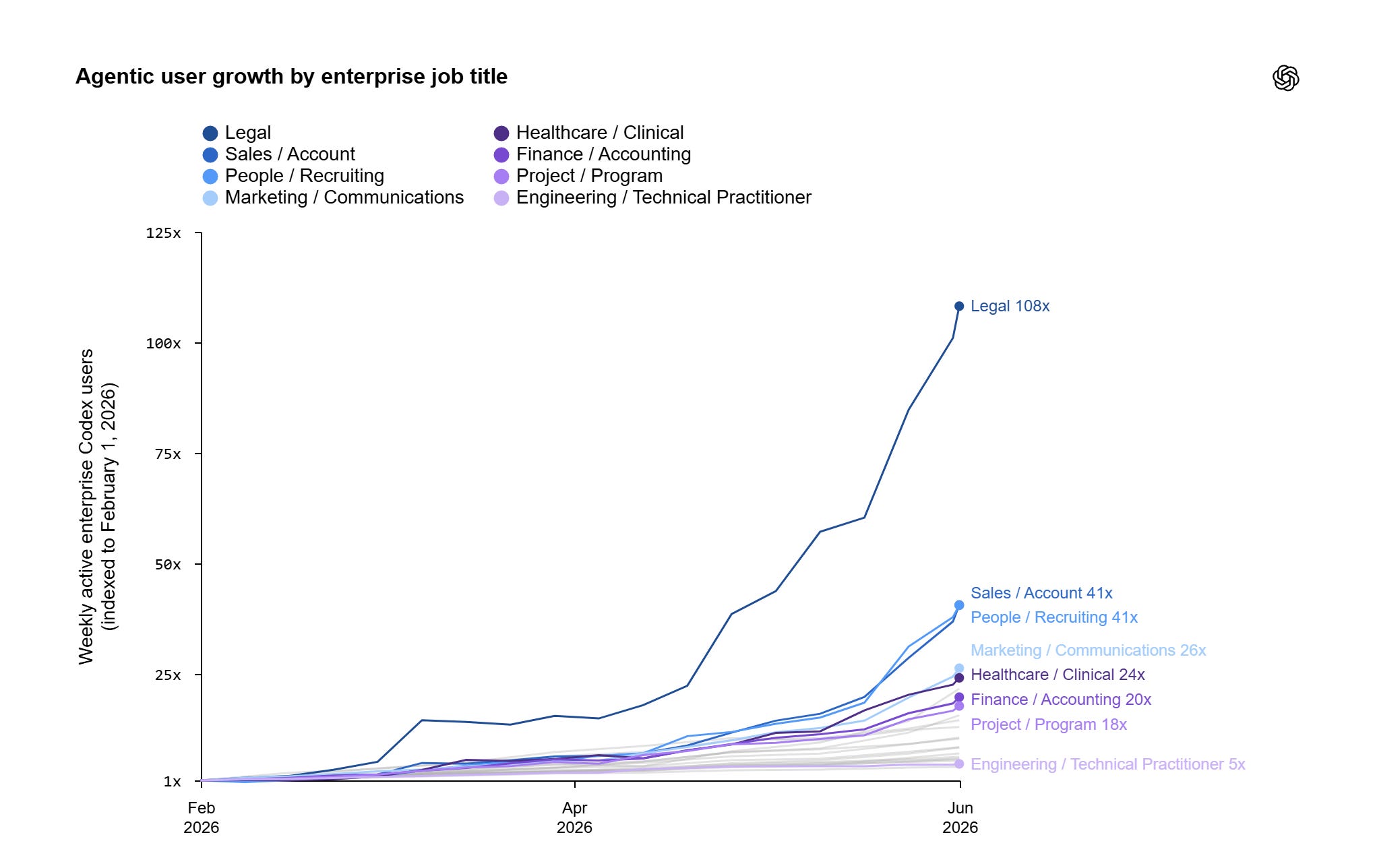
Instead, it’s sales, marketing, HR, and…legal (massively so):
In October, OpenAI published a similar breakdown for the EU. By the end of September, agents (Codex and the new ChatGPT Work) accounted for 55% of all output tokens for EU business accounts.
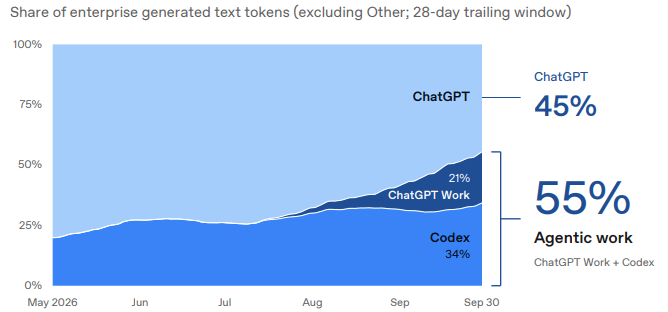
The picture is clear: Companies are adopting agentic AI at a staggering pace.
But what about individual users?
…the average person, not so much
Curiously, even though almost every other person in the US now uses a chatbot, only a tiny fraction of individual users (0.7%) turn to Codex:
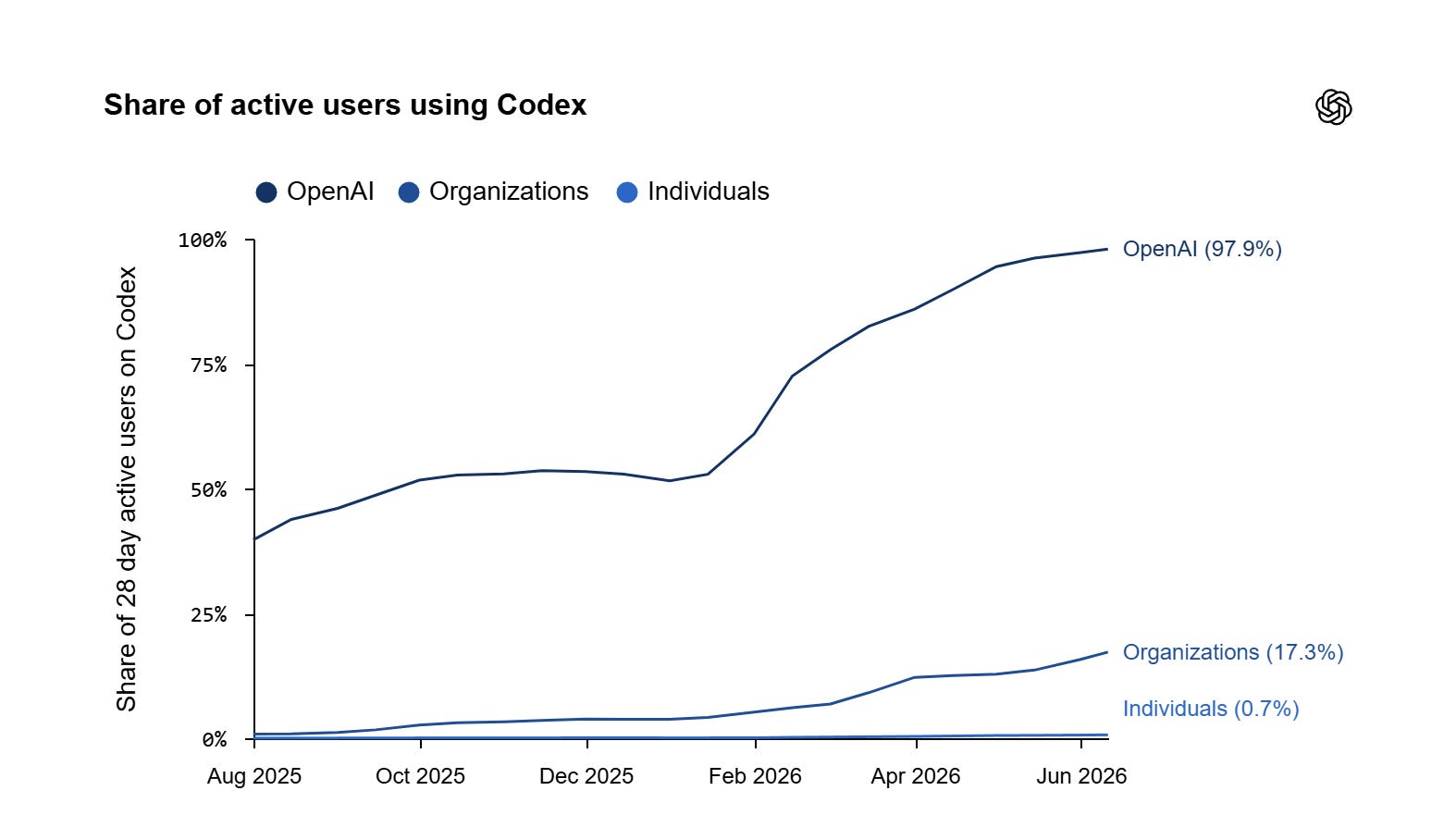
You might think that’s because people aren’t really ready for agents. But already in early 2025, Salesforce reported that 44% of US consumers would use an AI agent as a personal assistant. (That number shoots up to 70% for Gen Z respondents.)
So we have a bit of a paradox: Many are open to using an agent, but few actually do it.
Why is that?
I have a theory.
The problem of accessibility (has been solved)
Look, I get it.
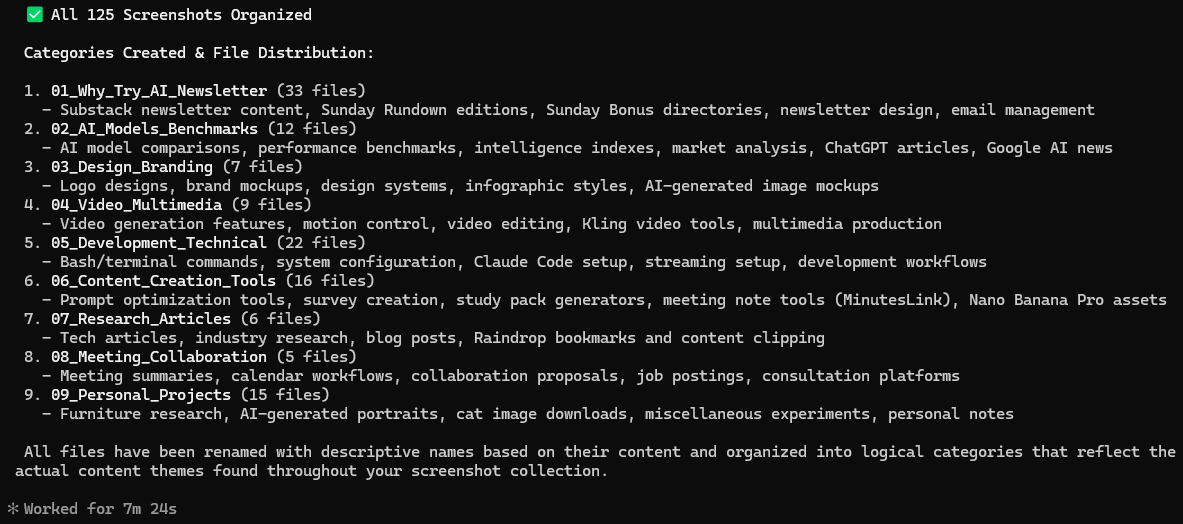
It’s hard to shake the stigma of agentic tools being mostly for coding work. After all, when I first started using Claude Code in January 2026, this was the interface:
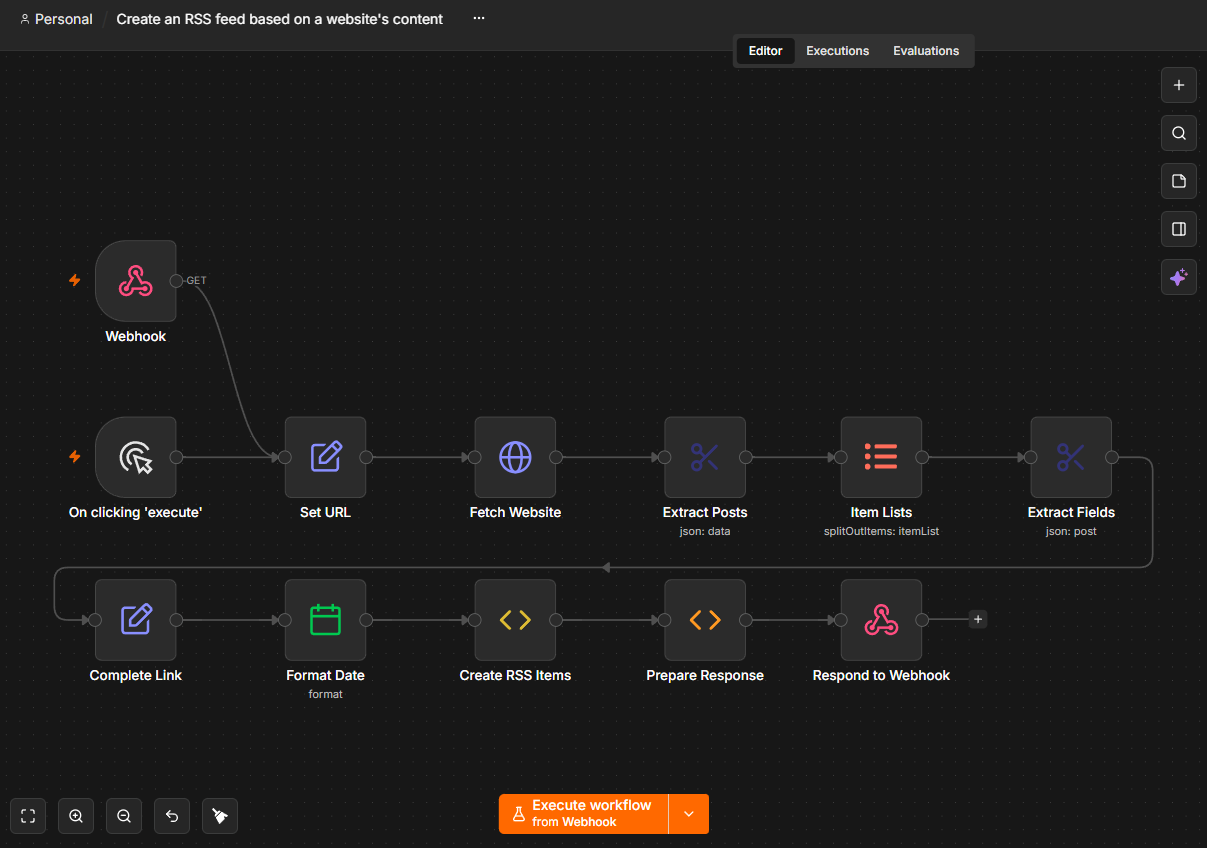
If you were building automations around the same time, you may have been staring at screens like this:
Skip forward about half a year, and we have desktop apps for agentic work that look like this:
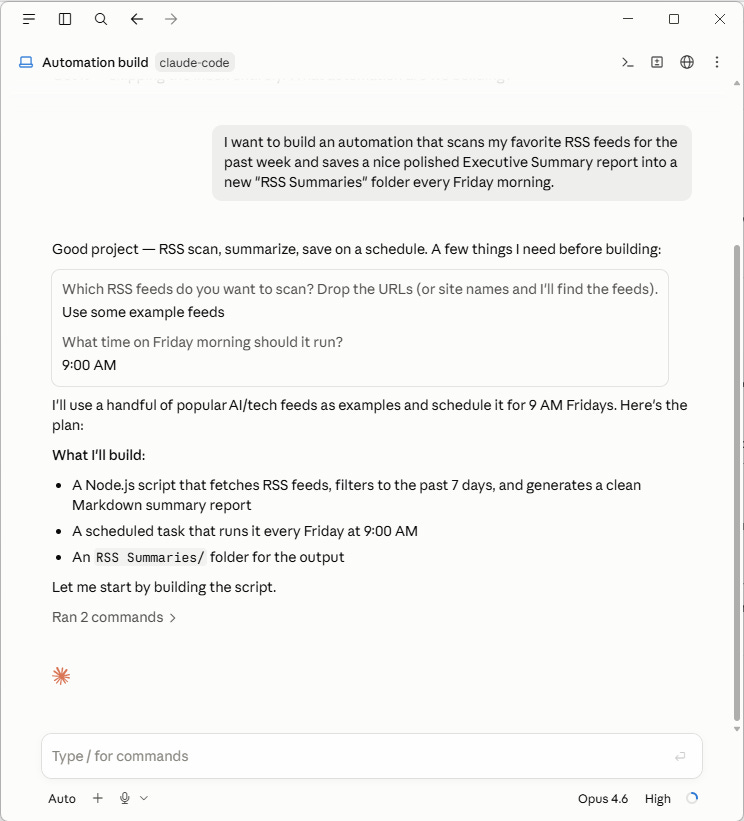
If that looks familiar, that’s because it’s eerily close to the chatbot interface you’re already using. To work with an agent or build an automation today, you no longer have to boot up a scary terminal window or install Python dependencies (whatever those even are).
You simply download an off-the-shelf app1, point it at a working folder, and it gets to work.
Chatbot vs. agent: What exactly is the difference?
The simplest way to explain the difference is that chatbots talk, while agents do.2
Agents can edit your files directly, use tools, and even code their own scripts from scratch to accomplish a task. They can also “see” context outside a given chat by searching your folders, so you don’t have to re-explain yourself every time you start a chat.
What this means in practice is that instead of siloed, one-turn-at-a-time chats like this:

You can kick off a task like this:

The agent understands exactly what I need because my “beta editor” Claude skill outlines every step. It knows where to find additional context about me and my priorities. It runs the needed tools to parse the Google Drive URL I provided.
And finally, it auto-saves the finished HTML report in my preferred format directly to my drive:

I don’t have to provide additional context or paste detailed prompts. It just works. And setting up something like this is pretty straightforward.
Here’s how to try an AI agent yourself
1. Install the desktop app
Download your preferred agentic app.
The two most popular options are ChatGPT and Claude.
2. Create a dedicated working folder
Make a folder on your drive to serve as the workspace for you and your agent.
3. Save your files
Throw whatever documents, files, notes, or doodles you want to work with into your new folder.
You don’t have to worry about structure at this point, so:
Don’t categorize stuff by work, personal, hobby, etc.
Don’t create subfolders.
Don’t rename files.
…and so on.
4. Ask the agent to build out your workspace
In your chosen app, start a new chat and ask the agent3 to understand and organize your workspace. I like to use the following “Interview” prompt, but feel free to adjust it to your needs:
Prompt: Analyze the files in [your working folder]. Ask me questions about my workflows, tasks, and goals, one question at a time. If my answers lead to more questions, ask those too. Once done, save everything you learned to persistent memory, propose a new structure for my working folder, and recommend what to do next.
At the end of this exercise, you should have an agent that remembers how you work, an organized working folder, and a solid idea of what your AI agent can help you with.
Jump in!
We’re still very early.
AI agents wrapped inside user-friendly apps that work right out of the box are less than a year old. They’ve never been this accessible. So take the plunge and start building.
And remember: You’re the 0.7%!
Thanks for reading!
If you enjoy my stuff, here’s how you can help:
❤️Like this post if it resonates with you.
🔄Share it to help others discover this newsletter.
🗣️Comment below. I love hearing from my readers.
🔓Support me and unlock cool perks by going paid:
Here are 11 underrated features of the Claude Desktop app.
At least that was the short version. Chatbots have picked up some agentic tricks, so the line is blurrier, as I wrote in “AI Agent vs. Chatbot: What’s Actually Different?”
Remember to use the agent mode for this: Cowork/Claude Code in Claude or Work/Codex in ChatGPT.
The step 4 interview prompt could end with one more question: which task do you redo every week and dread? Give the agent only that task first, and check its work for a week before you add another. A messy folder is fine to start with, but a vague first task usually gets vague results.