

Paid subscriber bonus: Grab the Claude Code Essentials pack with self-building skills, customizable workflows, and copy-paste starter prompts.
Three months ago, I decided to pair Claude Code with Obsidian to have a single place to keep all persistent context.
I argued that storing my knowledge in an Obsidian vault would make it easier for future agents to surface background details and pick up ongoing projects. And that’s exactly what happened when I made Claude Code and Codex work together.

But my Obsidian vault has evolved into more than just a reference library.
It now functions as a task inbox and project manager, too.
So today, I’d like to walk you through my Claude Code setup and show you where Obsidian fits into the picture.
(I also have a bonus goodie that can help you build out a similar routine.)
Let’s roll!
Claude Code Series
Check out my previous Claude Code articles to learn how to:
Identify what Claude Code can help you with (and know how to ask for it)
Use Claude Code with Obsidian to set up your personal knowledge base
Test & improve Claude Code skills with Skill Creator and my “Eval Maker”
Make Claude Code work with other agents in a shared workspace
Use helpful Claude Desktop features in your Claude Code workflows
A typical day in my life with Claude Code might involve four different activities, all tied to the context stored in my Obsidian vault.
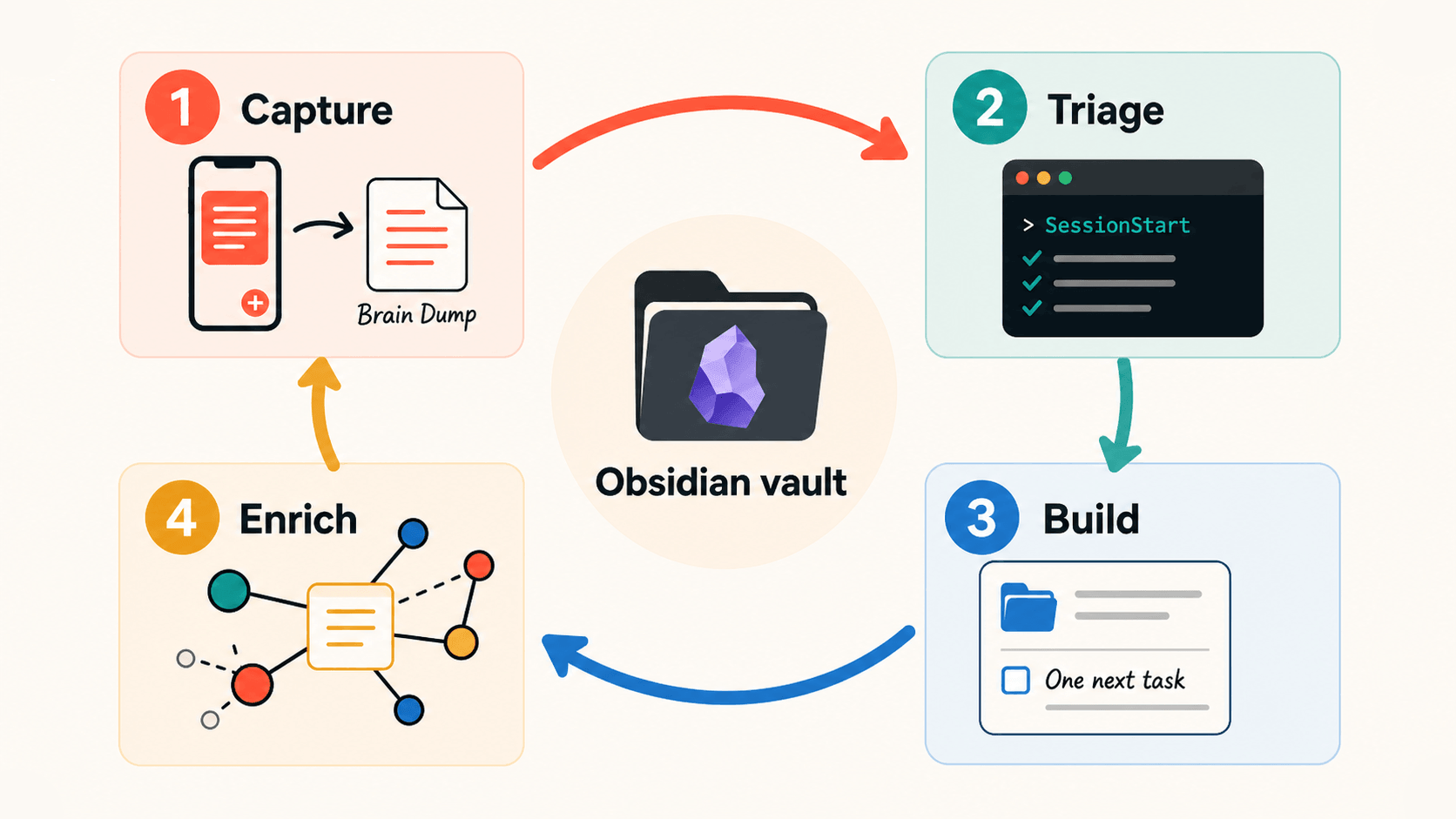
Let’s look at them in vaguely chronological order.
✍️ 1. Capture: Brain Dump.md + my phone
Inside my Obsidian vault, there’s an Inbox folder with a Markdown file called “Brain Dump” where I can log just about anything I want to tackle with Claude.
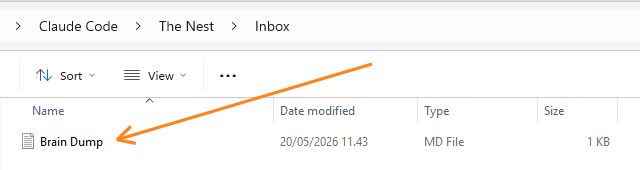
In addition to my laptop, I also have the Obsidian Android app installed on my phone.
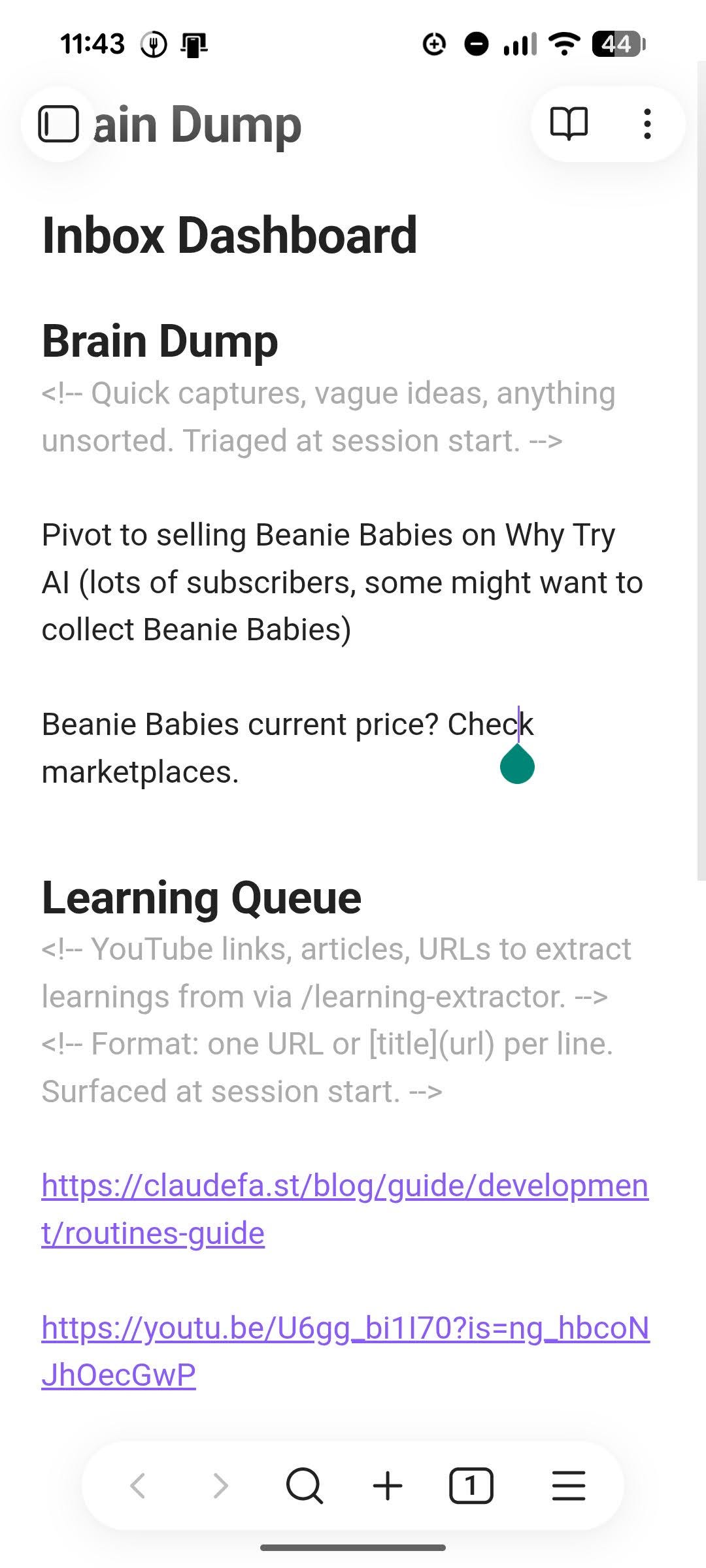
As I go through the day and batshit crazy genius ideas pop into my head, I can type (or dictate) them into the Brain Dump, which has two distinct sections:
Brain Dump: This is the classic note-capture for any ideas and plans.
Learning Queue: This one’s for articles, YouTube videos, and other sources related to how Claude Code works (tutorials, best practices, tips, etc). I simply copy-paste the link to the article or video in question, one per line.
At the end of the day, the file might look something like this:
Because I use Syncthing to sync the Obsidian vault between my devices, the local Brain Dump file is automatically updated when I turn on my laptop.
✅ 2. Triage: New Claude Code session
Whenever I start a fresh Claude Code chat, it triggers a special SessionStart hook.
This asks Claude to do two things:
Check the Brain Dump file for any new notes or learning URLs I might’ve added.
Pick a high-priority project from our work-in-progress list to tackle (see #3).
This happens automatically, without me having to request it, like so:
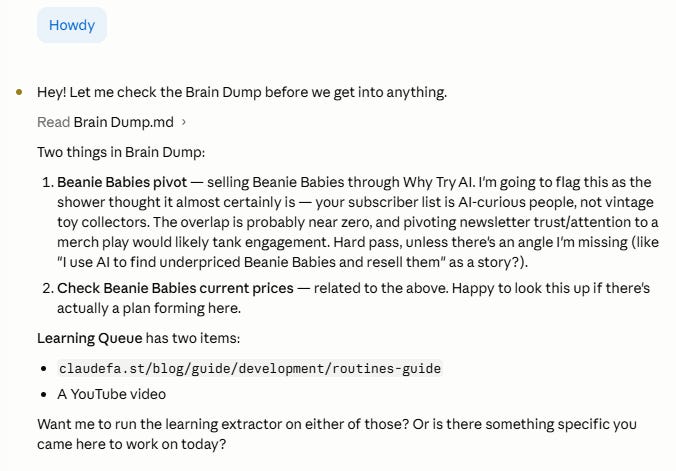
Claude surfaces all my notes, offers its initial reaction, and asks me what we want to tackle. From here, two things typically happen.
First, Claude and I go through the Brain Dump items together.
Second, Claude processes the learning queue and extracts insights we can apply to our setup.
Let’s look at each of those a bit more closely.
Work through the Brain Dump (together)
I discuss each note with Claude and provide additional context.
We go back and forth to decide what should happen with that particular item. The most common outcomes are:
We resolve the note together in the same session (for quick tasks/ideas).
We turn it into a bigger project and log it in our
Projects.mdfile (see #3).We decide it’s not worth focusing on and simply clear that item from the list.
Here’s how that might look:
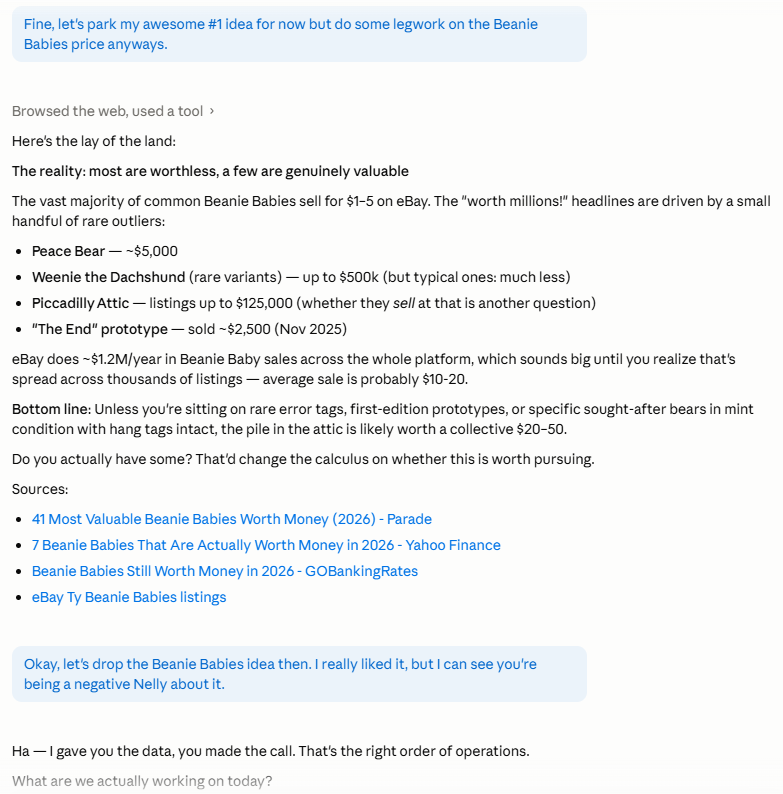
After I reluctantly abandon my dreams of Beanie Baby riches, Claude can move on to the Learning Queue.
Process the Learning Queue (Claude)
Every URL in the queue triggers my learning-extractor skill that does the following:
Fetches article content (or the transcript in the case of YouTube videos)
Analyzes the article or video and extracts key insights
Checks these against our current Claude Code workspace
Splits the findings into three buckets:
Already doing: Things already implemented in our setup.
Could adopt: Things we could implement right away if we wanted to.
Watch list: Interesting findings we can’t act on yet because of missing prerequisites, plan limitations, or priorities.
Here’s an example for the claudefa.st/blog/guide/development/routines-guide article:
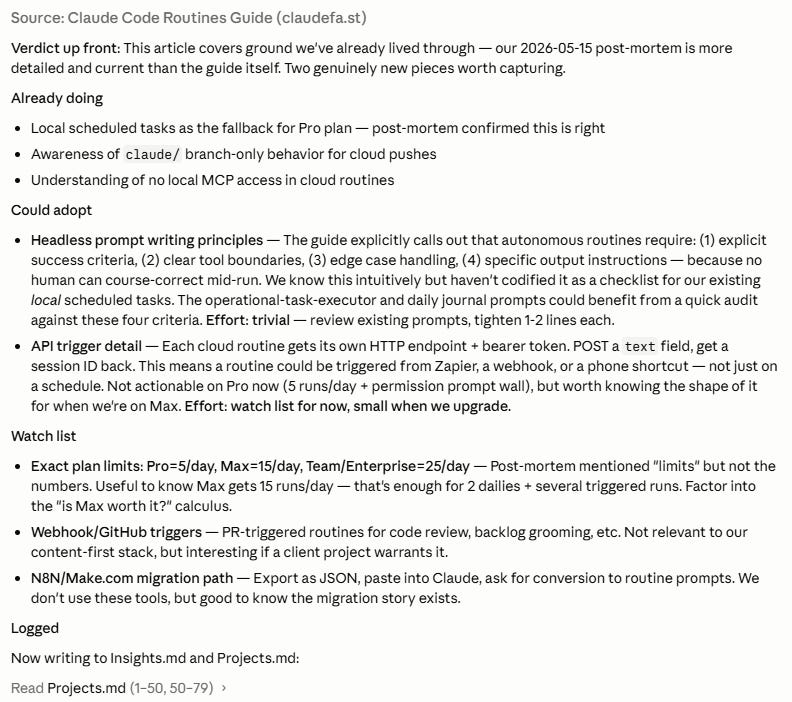
As you can see, most Brain Dump ideas and Learning Queue items will also end up touching at least one of two files in the Obsidian vault:
Insights.md: Stores context about the way I work, relevant tools and procedures we came across, and anything else relevant to my setup. Claude Code can reference this file on the fly whenever we work on a related project or task.
Projects.md: This is our Obsidian version of a Trello board where Claude Code and I log projects, prioritize them, and track their progress. I don’t really touch this file directly. Instead, Claude brings up relevant items in any chat and updates projects accordingly.
And hey, what a suspiciously convenient segue to my very next point…
🛠️ 3. Build: Grab an existing project to work on
If I still want to keep going after clearing the Brain Dump, Claude will surface a project on our list based on its priority and status:
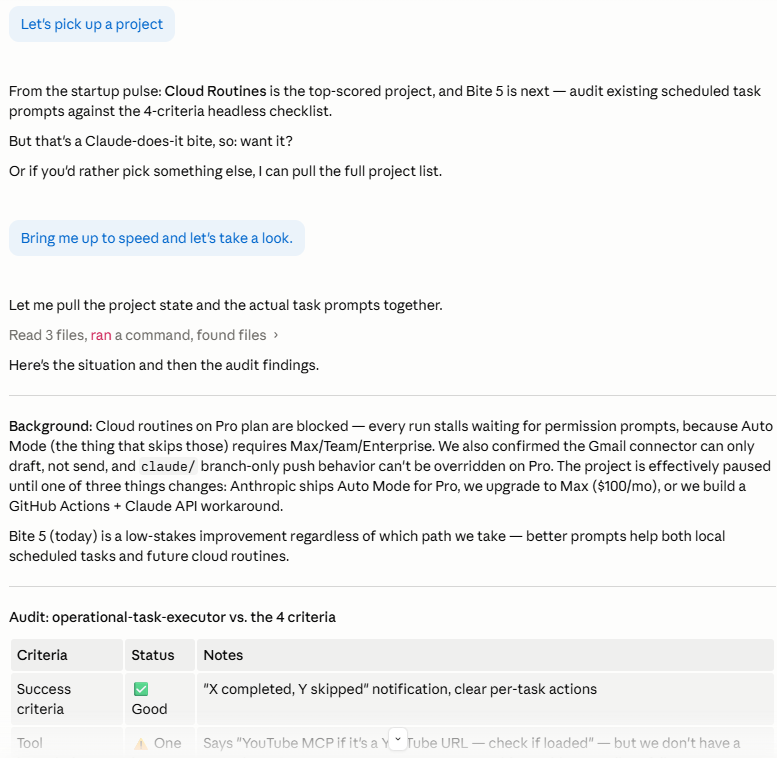
As you can see, Claude and I decided to work with the concept of “bites”: small sub-tasks in a project that can be realistically knocked off in a single session.
That’s not an accident.
Quite simply, I ended up with a long list of big projects that never moved anywhere, because they felt too overwhelming to tackle in the middle of an ongoing session. So I asked Claude to split each project up into self-contained tasks.
This way, I can complete just one minor task and still feel like the project is moving forward. Once the task is finished, Claude updates the project status in Obsidian, so it’s ready to be picked up in a future session.
🧠 4. Enrich: Save and organize new insights
Each of the first three steps will usually generate new knowledge along the way.
Brain Dump notes get turned into detailed projects, learning queue surfaces new approaches to try, my in-chat input gives Claude additional context to log, and so on.
Whenever something like that happens, Claude automatically runs a quick “fanout” process: identifying where a piece of knowledge belongs and filing it accordingly.
These learnings can end up in several places:
New notes: Whenever a concept (person, company, tool, etc.) shows up in at least three other spots in the vault, it becomes a candidate for a standalone note. Claude “upgrades” the concept and moves all existing details about it into a new, dedicated note.
Existing notes: If there’s already a note for the concept, additional info about it gathered from the session gets filed there.
Related notes: If Claude spots a relationship between separate notes—like if it learns that Andrej Karpathy now works for Anthropic—it’ll update the separate “Karpathy” and “Anthropic” notes and create a wiki connection between them.
Workspace files: If a detail is related to my work with Claude Code, it’ll be added to the relevant section of something like
Projects.mdorInsights.md(or both).
Here’s how that might look after we extract learnings from that “Claude Routines” guide:
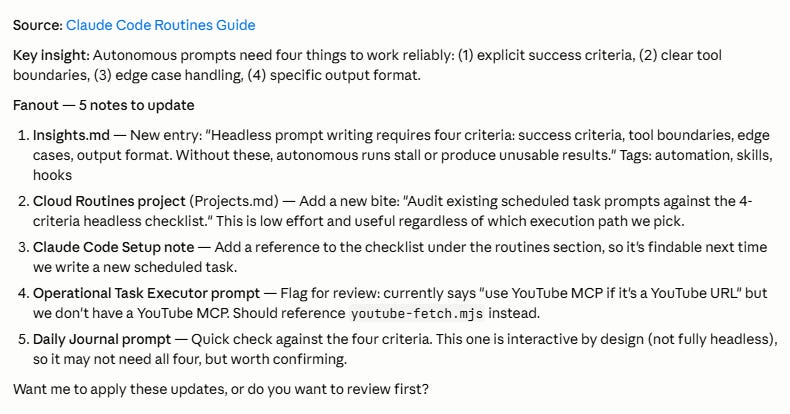
Each edit might be minor on the surface (e.g. a single line added to an existing note), but multiply that across dozens of sessions and fanout runs, and you end up with a constantly growing, interconnected knowledge web.
🔁 The self-updating Obsidian loop
Let’s recap what just happened.
I saved a few thoughts and links on my phone. Claude triaged them at session start and pulled relevant context from existing notes and projects into the chat.
When we were done working, Claude collected and saved new insights, enriching the knowledge base in the process.
It’s a closed loop: Captured ideas trigger the triage, which relies on past notes for context, which feeds into the session’s work, which generates new insights, which get saved as projects and/or new notes, which serve as better context for future sessions.
Rinse. Repeat.
At the core of this lies the Obsidian vault that serves as the primary anchor for idea capture, projects, insights, notes, and everything else.
The cool part is that I don’t have to actively maintain this system. Claude does this on its own as we work. Every session leaves the vault a little more connected, and every future session kicks off from a stronger foundation as a result.
Pretty damn cool, eh?
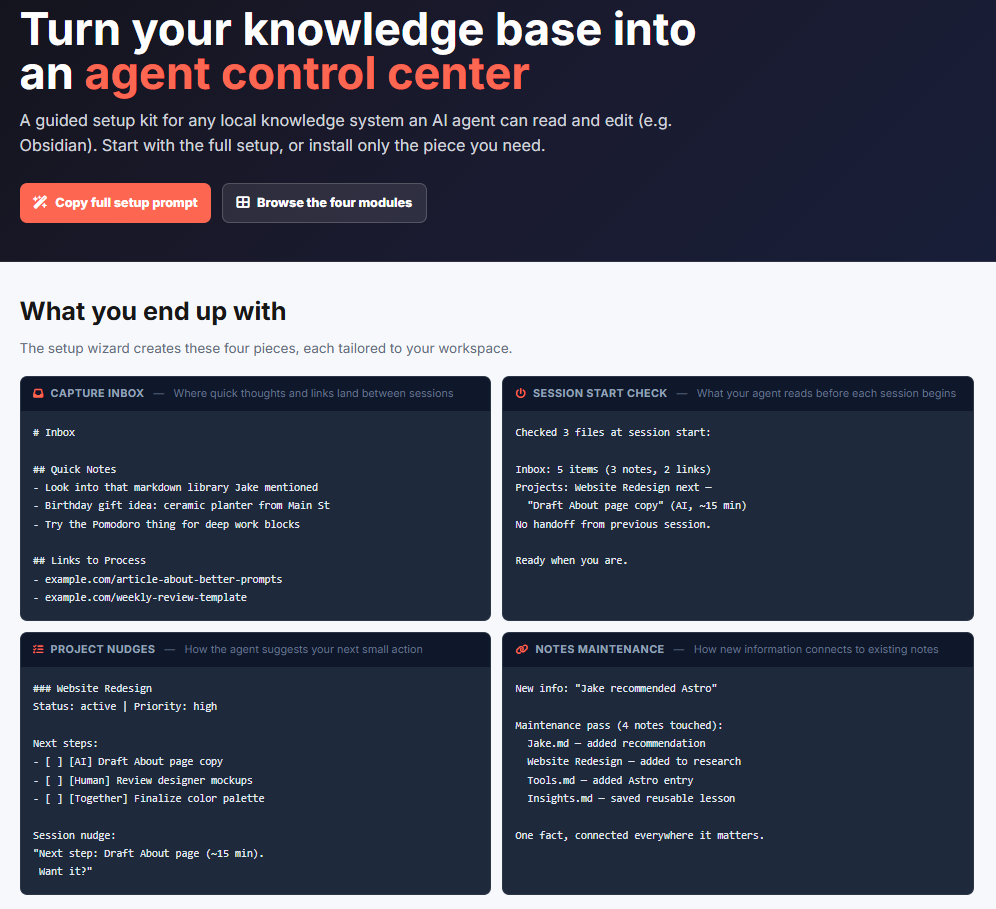
Want to build your own agent control center?
What I showed you is my setup for Obsidian and Claude Code, but the premise works with other ways of capturing notes and any AI agents that can modify them.
To build your own version, you’ll need four components:
Capture point: A file where you save your ideas, thoughts, and research links.
Startup check: Instructions that tell the agent what to scan at session start.
Project tracker: Dashboard, sheet, .md file, etc. that keeps track of your projects.
“Fanout” routine: Instructions or skills that update notes with new info.
Everything you saw above runs on my custom variations of these four elements.
You now have all the ingredients to build out a control center of your own.
If you want to skip the manual setup, I put together a starter kit that does the heavy lifting for you. You paste one prompt, it scans your workspace, asks you questions, and creates a version tailored to the way you work:
If that’s the kind of thing that tickles your fancy, find it on the other side of the paywall.